 Carelii
Sign In/Up: How It Works
You can sign in or sign up to Carelii in two ways: with your email or phone number, or with a social account (Google, Facebook, TikTok, or Apple). This page explains both options and the consents you'll see during sign-in/up.
Email or Phone
Sign in or sign up using your email address or phone number. You'll receive a one-time verification code to confirm your identity.
Enter your email or phone number on the sign-in/up screen. We'll send you a one-time verification code. After you enter the code, you agree to our Privacy Policy and Terms of Service, and (if you use a phone number) to receive SMS as described below.
Social Sign-In
Sign in or sign up quickly with Google, Facebook, TikTok, or Apple. Your existing account is used to create your Carelii account.
Tap or click the button for Google, Facebook, TikTok, or Apple on the sign-in/up screen. You'll be asked to sign in with that provider. By continuing, you agree to Carelii's Privacy Policy and Terms of Service.
Sign-in/up screen
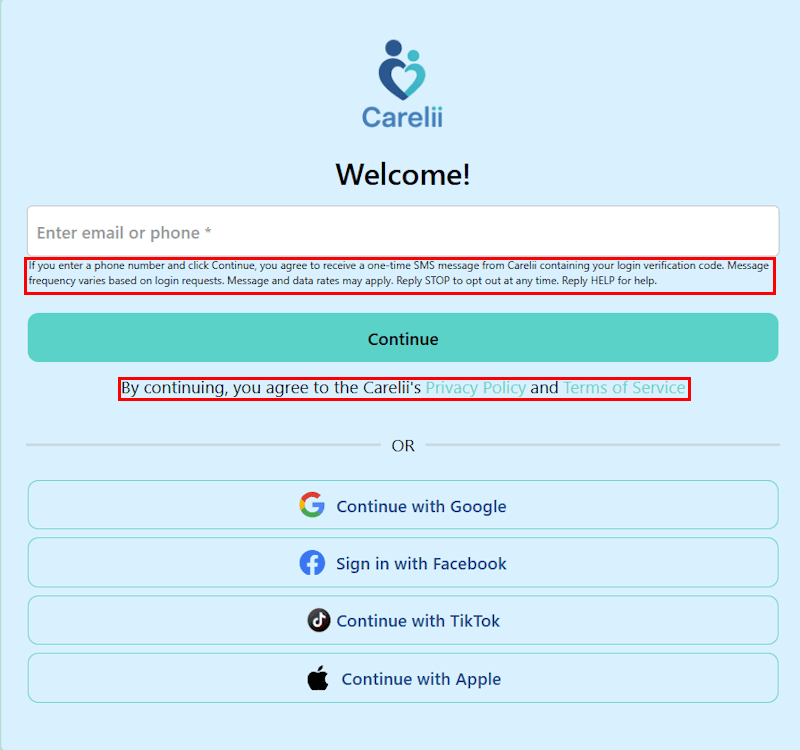
Agreement to Privacy Policy and Terms of Service
SMS consent (when using phone number)
If you enter a phone number and click Continue, you agree to receive a one-time SMS message from Carelii containing your login verification code. Message frequency varies based on login requests. Message and data rates may apply. Reply STOP to opt out at any time. Reply HELP for help.